> For the complete documentation index, see [llms.txt](https://argos-ci.com/docs/llms.txt). Markdown versions of documentation pages are available by appending `.md` to page URLs; this page is available as [Markdown](https://argos-ci.com/docs/learn/deployments.md).
# Deployments
Deploy your Storybook or static build to a unique Argos URL on every pull request to preview and share it.
A **deployment** on Argos is a static build — most commonly a Storybook — served on a unique URL that you can open, share, and review. When you run `argos deploy` in CI, Argos uploads the build, generates a URL, and posts the status back to your pull request.
Deployments pair naturally with visual testing: the same Storybook you test with Argos becomes a live preview reviewers can browse, right from the pull request — with no hosting of your own to maintain.
Use deployments to:
* Preview a Storybook for every pull request.
* Share a live link with designers, product, or stakeholders to review work in context.
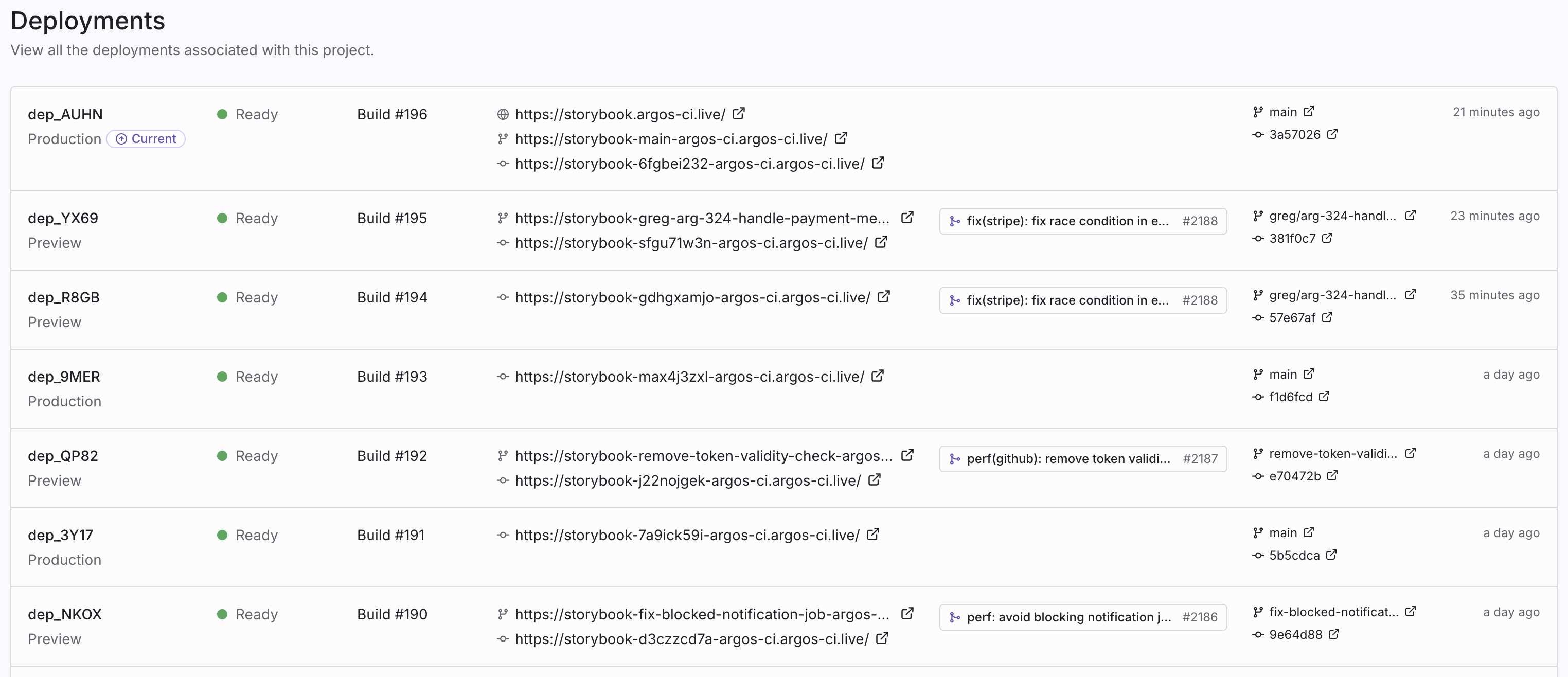
* Browse the history of every deployed build across branches and commits.
*Deployments list in the Argos dashboard.*
### How it works
A deployment is created in three phases:
1. **Build** — The Argos CLI scans your local directory and computes a content hash for every file.
2. **Upload** — Argos returns pre-signed upload URLs for the files it doesn't already have. Files that match an existing hash are skipped, so re-deploying an unchanged build is near-instant.
3. **Serve** — Once the upload finishes, Argos finalizes the deployment, assigns it a URL, and reports the status to your Git provider.
Each deployment is **immutable**. Re-running the deploy command always produces a new deployment with its own URL—the previous one keeps working.
### Quickstart
The following steps deploy a Storybook. The same flow works for any static directory (Vite build, Next.js export, plain HTML, etc.).
{% stepper %}
{% step %}
### Install the Argos CLI
{% tabs %}
{% tab title="npm" %}
```
npm i --save-dev @argos-ci/cli
```
{% endtab %}
{% tab title="yarn" %}
```
yarn add --dev @argos-ci/cli
```
{% endtab %}
{% tab title="pnpm" %}
```
pnpm add --save-dev @argos-ci/cli
```
{% endtab %}
{% tab title="bun" %}
```
bun add --dev @argos-ci/cli
```
{% endtab %}
{% endtabs %}
{% endstep %}
{% step %}
### Build your static site
Generate the directory you want to deploy. For Storybook:
```bash
npm run build-storybook
```
This produces a `storybook-static/` directory.
{% endstep %}
{% step %}
### Deploy
{% tabs %}
{% tab title="npm" %}
```
npm exec -- argos deploy ./storybook-static
```
{% endtab %}
{% tab title="yarn" %}
```
yarn run argos deploy ./storybook-static
```
{% endtab %}
{% tab title="pnpm" %}
```
pnpm exec -- argos deploy ./storybook-static
```
{% endtab %}
{% tab title="bun" %}
```
bun x argos deploy ./storybook-static
```
{% endtab %}
{% endtabs %}
The CLI uploads your build and prints a unique URL when the deployment is ready:
```
✔ Deployed: https://my-project-abcd123-acme.argos-ci.live
```
By default, the deployment is created in the **preview** environment. To deploy to **production**, add the `--prod` flag:
{% tabs %}
{% tab title="npm" %}
```
npm exec -- argos deploy ./storybook-static --prod
```
{% endtab %}
{% tab title="yarn" %}
```
yarn run argos deploy ./storybook-static --prod
```
{% endtab %}
{% tab title="pnpm" %}
```
pnpm exec -- argos deploy ./storybook-static --prod
```
{% endtab %}
{% tab title="bun" %}
```
bun x argos deploy ./storybook-static --prod
```
{% endtab %}
{% endtabs %}
See [Environments](/docs/learn/deployments/environments.md) for the rules that decide which environment a deployment lands in.
{% endstep %}
{% endstepper %}
### Authentication
The deploy command uses the same authentication as the rest of the Argos CLI. Set the `ARGOS_TOKEN` environment variable in CI:
```bash
ARGOS_TOKEN=
```
You can find the project token in **Settings → Authentication → Project token**. On GitHub Actions, you can also use [OIDC or tokenless authentication](/docs/learn/integrations/github-actions-authentication.md) to avoid managing a secret.
### What's next
* [**Environments**](/docs/learn/deployments/environments.md) — How preview and production deployments are determined, and how to customize the production branch.
* [**URLs and domains**](/docs/learn/deployments/urls-and-domains.md) — The URLs Argos generates for each deployment, and how to set the production domain.
* [**Access protection**](/docs/learn/deployments/access-protection.md) — Restrict who can open deployment URLs.
* [**Use in CI**](/docs/learn/deployments/use-deployments-in-ci.md) — Deploy automatically on every pull request with GitHub Actions.
* [**Lifecycle and retention**](/docs/learn/deployments/retention.md) — How long deployments last, why they can't be overwritten, and how to pick a deploy cadence.
---
# Agent Instructions
This documentation is published with GitBook. GitBook is the documentation platform designed so that both humans and AI agents can read, navigate, and reason over technical content effectively. Learn more at gitbook.com.
## Querying This Documentation
If you need additional information that is not directly available in this page, you can query the documentation by asking a question.
Perform an HTTP GET request on the following URL with the `ask` and `goal` query parameters:
```
GET https://argos-ci.com/docs/learn/deployments.md?ask=&goal=
```
`ask` is the immediate question: it should be specific, self-contained, and written in natural language.
`goal` is what the user is ultimately trying to achieve, the reason they need the answer. Sharing it helps GitBook give you a better, more relevant answer. A goal is most helpful when it describes the outcome the user wants rather than restating the question. For example, with `ask=how do I create an API token`, a goal like `automate deployments from our CI pipeline` lets GitBook tailor the answer to that use case.
The response will contain a direct answer to the question and relevant excerpts and sources from the documentation.
Use this mechanism when the answer is not explicitly present in the current page, you need clarification or additional context, or you want to retrieve related documentation sections.