> For the complete documentation index, see [llms.txt](https://argos-ci.com/docs/llms.txt). Markdown versions of documentation pages are available by appending `.md` to page URLs; this page is available as [Markdown](https://argos-ci.com/docs/learn/deployments/use-deployments-in-ci.md).
# Use deployments in CI
Run argos deploy from CI to create a deployment on every pull request, with a GitHub Actions Storybook example.
Running `argos deploy` from CI is the most common setup: a new deployment is created on every push to a pull request, and the deployment link appears in the PR comment alongside Argos visual tests.
This page walks through a GitHub Actions setup for Storybook. The same pattern works for any static build and any CI provider.
### Prerequisites
* A static build step that produces a directory (for Storybook: `npm run build-storybook` → `storybook-static/`).
* An `ARGOS_TOKEN` available as a CI secret. You can also use [OIDC or tokenless authentication](/docs/learn/integrations/github-actions-authentication.md) to avoid managing a secret.
### GitHub Actions example
{% code title=".github/workflows/argos-deploy.yml" %}
```yaml
name: Deploy Storybook to Argos
on:
pull_request:
push:
branches:
- main
jobs:
deploy:
runs-on: ubuntu-latest
steps:
- uses: actions/checkout@v6
- uses: actions/setup-node@v6
with:
node-version: 22
- run: npm ci
- run: npm run build-storybook
- run: npx --no-install argos deploy ./storybook-static
env:
ARGOS_TOKEN: ${{ secrets.ARGOS_TOKEN }}
```
{% endcode %}
A few notes:
* The workflow listens to both `pull_request` and `push` to `main`. Pull request runs produce **preview** deployments; pushes to `main` produce **production** deployments (because `main` matches the default production branch pattern—see [Environments](/docs/learn/deployments/environments.md)).
* `actions/checkout` gives Argos the commit SHA and branch it needs to associate the deployment with the right pull request.
* The `ARGOS_TOKEN` is the project token from **Settings → Authentication → Project token**.
### Force a production deployment
If your production branch differs from your repository's default branch (or if you want to be explicit), pass the `--prod` flag:
```yaml
- run: npx --no-install argos deploy ./storybook-static --prod
env:
ARGOS_TOKEN: ${{ secrets.ARGOS_TOKEN }}
```
You can keep the same workflow for both preview and production by branching on the event:
```yaml
- name: Deploy
run: |
if [ "${{ github.event_name }}" = "push" ]; then
npx --no-install argos deploy ./storybook-static --prod
else
npx --no-install argos deploy ./storybook-static
fi
env:
ARGOS_TOKEN: ${{ secrets.ARGOS_TOKEN }}
```
### Combine with visual testing
The `deploy` and `upload` commands are independent: you can run both in the same workflow to get a deployment URL **and** Argos visual tests on the same commit.
```yaml
- run: npm run build-storybook
- run: npm run test:visual # Your usual Argos visual test job
env:
ARGOS_TOKEN: ${{ secrets.ARGOS_TOKEN }}
- run: npx --no-install argos deploy ./storybook-static
env:
ARGOS_TOKEN: ${{ secrets.ARGOS_TOKEN }}
```
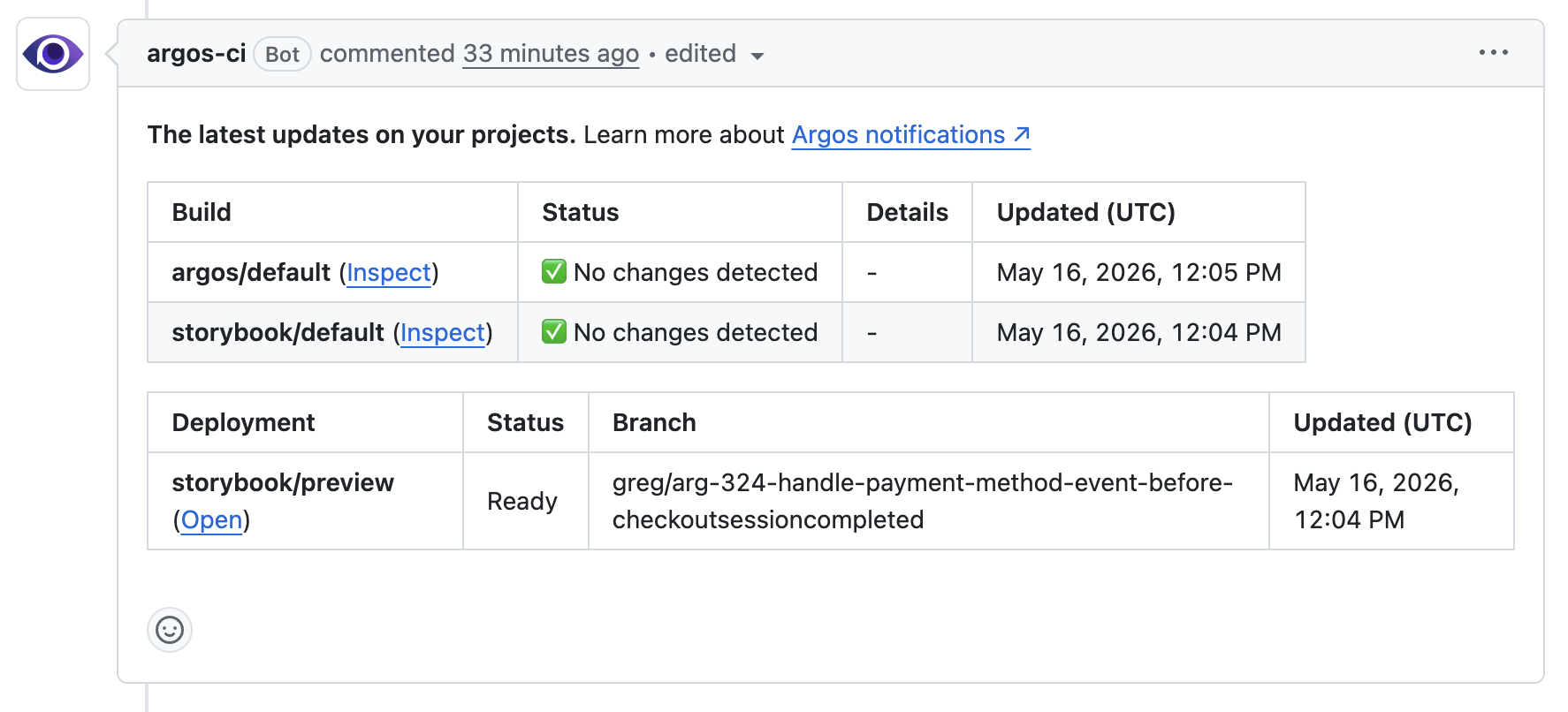
Argos posts a single pull request comment that lists both the deployment URLs and the visual build results.
GitHub pull request comment showing both the deployment and the Argos visual build.
### Status checks
Each deployment registers a commit status named `argos-deploy/`. The status starts as **pending** when the upload begins and becomes **success** when the deployment is ready. You can require it in your branch protection rules if a missing deployment should block a merge.
### Other CI providers
The `argos deploy` command has no GitHub-specific behavior. To run it on another CI provider:
1. Build your static directory in your pipeline.
2. Set `ARGOS_TOKEN` as a secret.
3. Run `argos deploy ` (add `--prod` for production).
Argos automatically detects the commit SHA, branch, and pull request number from the most common CI environment variables.
### Related
* [Deployments overview](/docs/learn/deployments.md)
* [Environments](/docs/learn/deployments/environments.md)
* [GitHub integration](/docs/learn/integrations/github-integration.md)
* [Argos CLI reference](/docs/reference/argos-command-line-interface-cli.md)
---
# Agent Instructions
This documentation is published with GitBook. GitBook is the documentation platform designed so that both humans and AI agents can read, navigate, and reason over technical content effectively. Learn more at gitbook.com.
## Querying This Documentation
If you need additional information that is not directly available in this page, you can query the documentation by asking a question.
Perform an HTTP GET request on the following URL with the `ask` and `goal` query parameters:
```
GET https://argos-ci.com/docs/learn/deployments/use-deployments-in-ci.md?ask=&goal=
```
`ask` is the immediate question: it should be specific, self-contained, and written in natural language.
`goal` is what the user is ultimately trying to achieve, the reason they need the answer. Sharing it helps GitBook give you a better, more relevant answer. A goal is most helpful when it describes the outcome the user wants rather than restating the question. For example, with `ask=how do I create an API token`, a goal like `automate deployments from our CI pipeline` lets GitBook tailor the answer to that use case.
The response will contain a direct answer to the question and relevant excerpts and sources from the documentation.
Use this mechanism when the answer is not explicitly present in the current page, you need clarification or additional context, or you want to retrieve related documentation sections.