Tags
Tags let you categorize screenshots so you can quickly filter a build down to the changes you care about. For example, you might tag screenshots by page area, feature, or test suite and then review only the relevant subset during a build review.
Filtering by tags in the UI
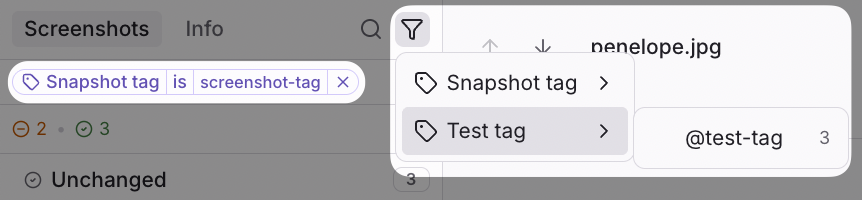
- Open a build in Argos.
- Click the Filter button.
- Select one or more tags to narrow the screenshot list.
- Once selected filter chip appears.
Where tags come from
Tags can come from two sources in screenshot metadata:
| Source | Field | Description |
|---|---|---|
| Screenshot | tags | Custom tags you define to categorize the screenshot itself. |
| Test | test.tags | Tags inherited from the test that generated the screenshot (e.g. Playwright test tags). |
Adding custom tags through SDKs
Playwright
Playwright test tags are automatically forwarded to Argos. You have several options for how to add tags to your Playwright tests.
tests/homepage.spec.ts
import { test } from "@playwright/test";
import { argosScreenshot } from "@argos-ci/playwright";

// Option 1: At the describe level with the @ prefix
describe("Homepage @desktop @homepage", () => {
  // Option 2: In the test name with the @ prefix
  test("homepage @desktop @homepage", async ({ page }) => {
    await page.goto("/");
    await argosScreenshot(page, "homepage");
  });

  // Option 3: As a test option
  test("homepage", { tag: ["@desktop", "@homepage"] }, async ({ page }) => {
    await page.goto("/");
    await argosScreenshot(page, "homepage");
  });

  // Option 4: In the argosScreenshot options
  test("homepage", async ({ page }) => {
    await page.goto("/");
    await argosScreenshot(page, "homepage", {
      tags: ["@desktop", "@homepage"],
    });
  });
});
Read the Playwright test tags documentation for more details on how to use test tags in your tests.
Cypress
In Cypress, you can add tags to screenshots through the tags option in the cy.argosScreenshot command.
cypress/e2e/homepage.cy.js
it("screenshot homepage", async ({ page }) => {
  cy.visit("https://localhost:3000/");
  cy.argosScreenshot("homepage", { tags: ["@desktop", "@homepage"] });
});
Puppeteer
In Puppeteer, you can add tags to screenshots through the tags option in the argosScreenshot function.
tests/homepage.spec.js
import { argosScreenshot } from "@argos-ci/puppeteer";
const puppeteer = require("puppeteer");

(async () => {
  const browser = await puppeteer.launch();
  const page = await browser.newPage();
  await page.goto("https://localhost:3000/");
  await argosScreenshot(page, "homepage", {
    tags: ["@desktop", "@homepage"],
  });
  await browser.close();
})();