Collaborative reviews
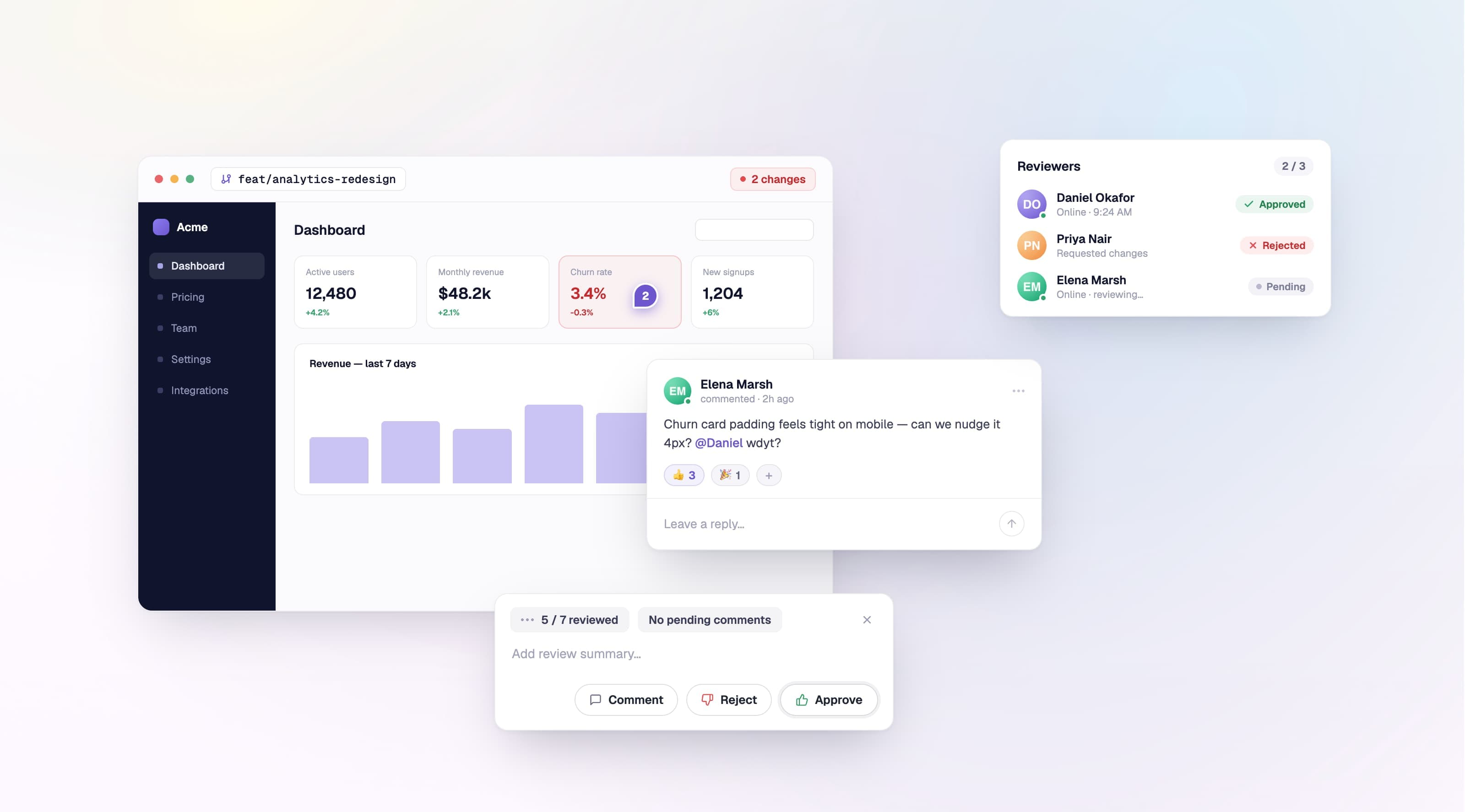
Reviewing a build used to be a solo, one-shot decision — only the latest review counted, and there was nowhere to talk through what you were seeing. Reviews in Argos are now a place to collaborate. Request the people you need, leave comments pinned to exactly what changed, and resolve the discussion together — all updating in real time.
Every reviewer's decision now counts on its own, so a build reflects the whole team's input instead of just the last person to weigh in. And it's not just people: the CLI now exposes the full review toolkit, so AI agents can read a build, pin comments to the exact screenshots that changed, and submit a complete review — just like a human reviewer.
- Multiple reviewers — request reviewers on a build and track each person's verdict individually, rather than overwriting it with the most recent one.
- Comment on exactly what changed — pin a comment to a precise point on a screenshot, or to a line range inside a text-based snapshot.
- Full discussion threads — reply, @mention teammates, react with emoji, and resolve or reopen threads once a conversation is done.
- Draft reviews — gather your comments into a pending review that stays private until you submit, then notifies everyone at once — GitHub-style.
- A redesigned review dialog — submit from a compact, focused popover with one-press Comment, Reject, and Approve actions.
- Real time, with presence — comments, reactions, resolutions, and review decisions appear live, and presence dots show who's online and their local time.
- Review from the API — every review and comment action is now in the public REST API: dismiss and list reviews, comment CRUD, replies, reactions, and thread resolve.
Comments are written in Markdown with / slash commands and @mentions, drafts persist locally so you never lose a thought, and review notifications now arrive as a single digest instead of one per action.
Learn more in the reviewing a build documentation, see how to review builds with AI agents, or explore the reviews and comments endpoints in the REST API reference.
Configure what Argos ignores
Project ignore behavior is now fully configurable. Turn the ignore feature off entirely, disable auto-ignore, or tune the auto-ignore threshold from project settings. When the feature is off, new builds ignore nothing — and the count of ignored screenshots now shows in the PR comment Details column.
Learn more in the ignore changes documentation.
Start a project without Git
You no longer need to connect GitHub or GitLab to get started. The redesigned New Project page offers two paths side by side: import from a Git provider, or create a project from just a name and link a repository later.
See if a build can be a baseline
Builds now show whether they're eligible to become a baseline for future builds — and, when they're not, why. A new chip explains the criteria at a glance: the build is complete, its tests passed, it's approved or merged, and it isn't a subset.
Learn more in the baseline build documentation.
Account-wide flaky tests
Flaky tests are no longer buried per project. A new Tests tab on your account aggregates active tests across every project you can see, sorted by flakiness, so the noisiest ones surface first.
Learn more in the tests dashboard documentation.
Screenshot actions menu
A new ⋮ menu on the baseline and changes panes lets you copy a screenshot link, copy it as Markdown, or download it — making it easy to reference a screenshot straight in a PR.