Why Playwright screenshots differ between macOS, Linux and Docker
Playwright screenshots differ across macOS, Linux and Docker because fonts, hinting and anti-aliasing differ. Measured on 1.63: what Docker and flags fix.

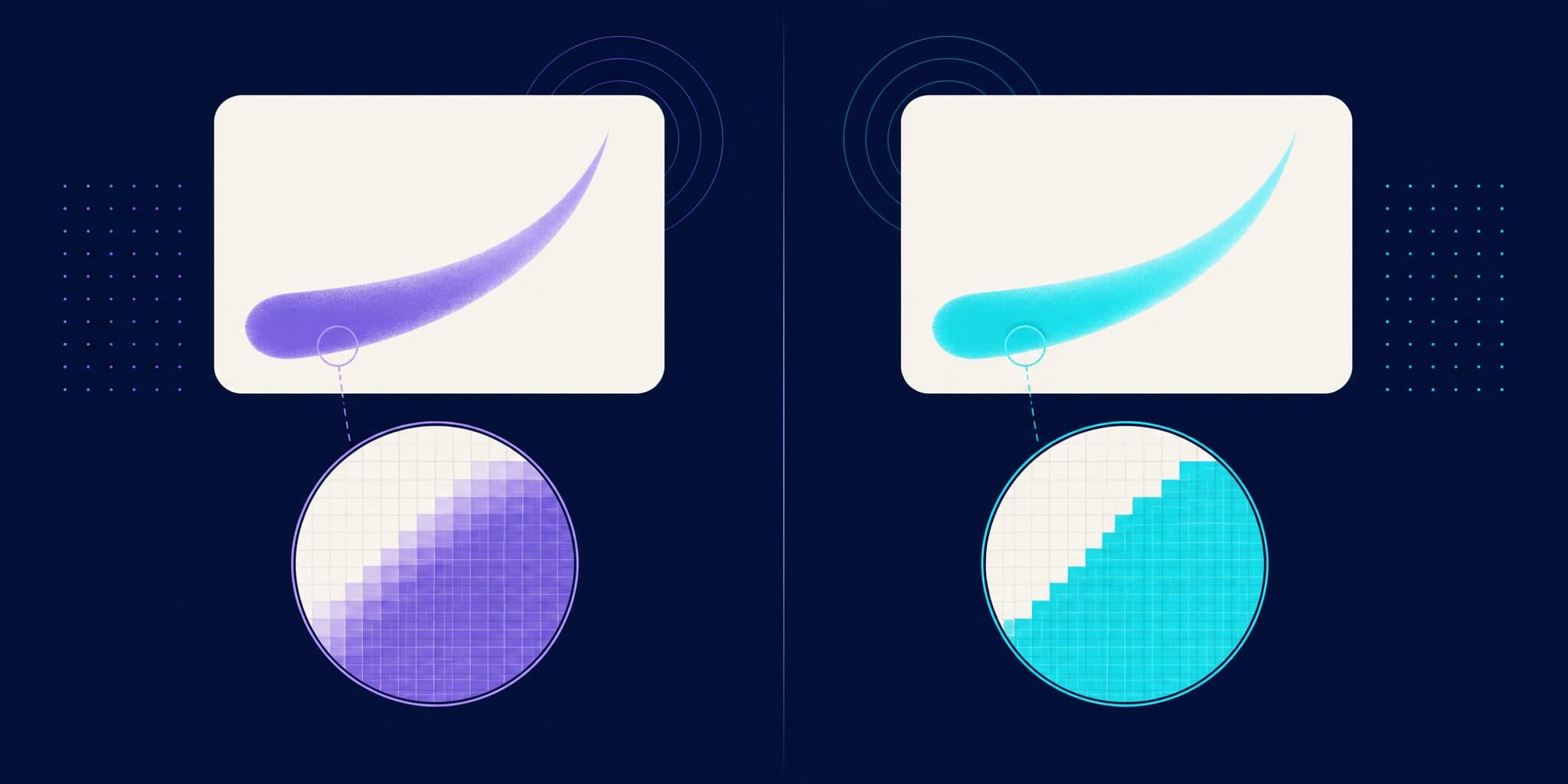
Playwright screenshots differ between macOS and Linux because Chromium draws text differently on each system: other fonts, another glyph rasterizer, different hinting and different anti-aliasing. That is why a toHaveScreenshot baseline made on your Mac fails your visual regression tests in CI, and why Docker only helps when every screenshot, baselines included, is rendered by the same Linux image. I measured it with Playwright 1.63.0: the official Docker image produced pixel-identical screenshots on arm64 and amd64, while macOS and Linux differed by about 39,000 pixels on the same page, and no Chromium flag closed the gap.
How much do macOS and Linux screenshots differ?
I rendered one text-heavy page (headings, paragraphs, a table, a code block, form fields, cards with box shadows) at 1280×800 with deviceScaleFactor: 1, using Playwright 1.63.0 (released September 2026) and its default headless browser, Chrome Headless Shell 153.0.8010.12. Three environments:
- macOS 26.6.2 on an Apple M1 Max.
- The official
mcr.microsoft.com/playwright:v1.63.0-nobleimage on linux/arm64. - The same image on linux/amd64, emulated by OrbStack 2.2.3 through Rosetta.
The page came in two versions: one with a common system font stack (system-ui, -apple-system, "Segoe UI", Roboto, ...) and one with a bundled web font (Geist, loaded from a woff2 file). I counted differences with the comparator toHaveScreenshot uses (pixelmatch with a 0.2 threshold and anti-aliasing detection), plus every pixel whose value changed at all.
| Comparison (1,024,000 pixels per image) | System font stack | Bundled web font |
|---|---|---|
| Same environment, captured twice | 0 | 0 |
| Docker arm64 vs Docker amd64 | 0 | 0 |
| macOS vs Docker, flagged by Playwright | 38,503 (3.8%) | 39,940 (3.9%) |
| macOS vs Docker, any change | 91,089 (8.9%) | 95,921 (9.4%) |
A real test run confirms it. With a baseline written on the Mac and a snapshot path shared by both platforms, the test failed inside the Linux container with:
Error: expect(page).toHaveScreenshot(expected) failed
  39940 pixels (ratio 0.04 of all image pixels) are different.
On this page, every environment was deterministic: repeated captures matched to the pixel. The differences come from the environment, not from flakiness.
Why does Chromium render the same page differently on macOS and Linux?
Here are the causes I could isolate, roughly in order of impact. Playwright's documentation lists more (hardware, power source, headless mode), and the advice is the same for all of them: compare screenshots from the same environment.
Fonts
A system font stack resolves to different fonts on each OS. On macOS, Chromium drew my system-ui text with San Francisco (.SF NS) and code with Menlo. In the official image, it drew the same text with WenQuanYi Zen Hei, a Chinese font that fontconfig picks for sans-serif and system-ui there, and code with Liberation Mono. The image only ships the fonts in Playwright's dependency list (Liberation, Noto Color Emoji, WenQuanYi Zen Hei and a few others). No flag can fix a different font, and different font metrics can also move line breaks, as a Playwright maintainer points out.
Hinting
Playwright runs headless tests in the headless shell, where Chromium's --font-render-hinting switch defaults to full. Hinting snaps glyph outlines to the pixel grid. On Linux, turning it off changed 42,730 pixels of the web font page; on macOS it changed none. It was the largest single cause on that page: without hinting, the macOS-vs-Linux gap fell from 39,940 to 5,415 pixels.
Anti-aliasing
Chromium enables LCD text by default on Linux, and only when subpixel anti-aliasing is available on macOS. In my Linux screenshots, one paragraph of web font text had 10,067 colored fringe pixels; the macOS version had none.
The rasterizer
Even with the same font file, no hinting and grayscale anti-aliasing, Skia draws glyphs through Core Text on macOS and FreeType on Linux. The edges never matched exactly: 1,907 pixels was the smallest gap I reached.
Headless mode
Opting into the new headless mode with channel: 'chromium' runs the full Chrome build instead of the headless shell. On Linux, it changed 43,630 pixels of the web font page. When Playwright 1.49 split the two modes, it told chrome and msedge channel users to update all screenshot expectations.
CPU architecture and device scale factor
The architecture moved nothing in my tests (more on that below). A different deviceScaleFactor does matter: on Linux, Chromium turns on subpixel positioning and drops hinting above 1x, so pin it in your config.
Why do screenshots still differ when I use Docker?
Docker gives you the same fonts and the same browser build, which removes the biggest causes above. A Playwright maintainer summed it up in 2022: Docker guarantees structural identity (layout and fonts), not pixel-perfect screenshots.
That thread, microsoft/playwright#13873, started in 2022 with arm64 and amd64 images producing different screenshots. It gathered 70 comments and was closed as "not planned" in May 2026. I could not reproduce the architecture difference with Playwright 1.61.1 or 1.63.0. On a second page with shadows, gradients, blur and canvas text, the worst case was 16 pixels off by one color level, below the default threshold and no bigger than the run-to-run noise inside the amd64 container. A 2025 test matrix in the same thread also found Linux x64 and arm64 baselines interchangeable on GitHub's runners. Two caveats: my amd64 container ran under Rosetta, which exposed no AVX2 to it, so it is not a physical x86 runner; and since 1.63, Playwright downloads Chrome for Testing on Linux arm64 too (release notes).
When Docker screenshots still drift, the cause is usually one of these:
- Local and CI use different image tags or Playwright versions.
- Baselines were written outside the container, or with different launch flags.
- The browser runs on the host and only the app runs in Docker.
- The Docker runtime changes something. One commenter reported a Docker Desktop update changing font rendering and switched to OrbStack. I only tested OrbStack.
Which Chromium flags reduce the differences?
Three Chromium flags come up again and again in these threads. I passed each to both macOS and Linux. On macOS, none of them changed a single pixel, so every reduction comes from the Linux side.
| Launch flags | System font page | Web font page |
|---|---|---|
| None (default headless shell) | 38,503 | 39,940 |
--disable-lcd-text | 37,713 | 34,318 |
--font-render-hinting=none | 38,503 | 5,415 |
--disable-lcd-text --font-render-hinting=none | 37,713 | 1,907 |
The pair plus --disable-font-subpixel-positioning | 39,213 | 4,931 |
New headless (channel: 'chromium'), no flags | 38,563 | 5,048 |
Pixels flagged by toHaveScreenshot between macOS and Linux, Playwright 1.63.0, checked October 2026.
--font-render-hinting=noneturns hinting off. Chromium only reads it in the headless shell; in new headless mode it changed 0 pixels. Base UI's visual regression script passes it, alongsideheadless: false.--disable-lcd-textforces grayscale anti-aliasing. It is the fix in this Stack Overflow answer about colored text edges in the official image.--disable-font-subpixel-positioning(Chromium switch) widened the gap when added to the pair: 4,931 pixels instead of 1,907.
The pair helps only when the fonts match, and it never reached zero. Adding it also changes your Linux output (37,943 pixels on the web font page), so regenerate baselines when you adopt it.
// playwright.config.ts
import { defineConfig } from "@playwright/test";

export default defineConfig({
  use: {
    launchOptions: {
      args: ["--disable-lcd-text", "--font-render-hinting=none"],
    },
  },
});
How do I get consistent screenshots across machines?
Make one environment the only source of screenshots, then make that environment easy to reach from any laptop.
1. Generate and compare baselines in CI. Never mix a baseline from your laptop with a capture from CI. The Playwright CI guide covers updating baselines from CI.
2. Pin the image and the package together. Install @playwright/test with an exact version (npm install -D -E @playwright/test@1.63.0) and use the matching image tag, as in Playwright's CI docs:
# .github/workflows/playwright.yml
name: Playwright Tests
on: [push, pull_request]
jobs:
  test:
    runs-on: ubuntu-latest
    container:
      image: mcr.microsoft.com/playwright:v1.63.0-noble
      options: --user 1001
    steps:
      - uses: actions/checkout@v6
      - uses: actions/setup-node@v6
        with:
          node-version: lts/*
      - run: npm ci
      - run: npx playwright test
3. On a Mac, run the browser in the CI image. Playwright's remote connection keeps the test runner on your machine and the browser in Docker:
docker run -p 3000:3000 --rm --init -it --workdir /home/pwuser --user pwuser \
  mcr.microsoft.com/playwright:v1.63.0-noble \
  /bin/sh -c "npx -y playwright@1.63.0 run-server --port 3000 --host 0.0.0.0"

PW_TEST_CONNECT_WS_ENDPOINT=ws://127.0.0.1:3000/ npx playwright test
With this setup, the screenshots taken from my Mac were pixel-identical to the ones rendered inside the container. One catch: the snapshot suffix comes from the runner's process.platform, so the baselines were still named -chromium-darwin.png. Drop the platform from the path so macOS and CI read the same file:
// playwright.config.ts
import { defineConfig } from "@playwright/test";

export default defineConfig({
  // Safe only if every screenshot is rendered by the same Linux image.
  snapshotPathTemplate: "{testDir}/__screenshots__/{testFilePath}/{arg}{ext}",
});
If your app runs on the host, start the container with --add-host=hostmachine:host-gateway and point tests at hostmachine, as the Docker docs describe.
4. Ship your fonts. Self-host web fonts so every environment draws the same outlines. toHaveScreenshot already waits for fonts to load before capturing.
5. Add tolerance last. On my page, the gap between platforms was as large as real changes. Replacing one word in a paragraph flagged 2,427 to 2,541 pixels on Linux, and a 1px padding change flagged 7,185 to 10,420. A button color change from #1f883d to #1a7f37 flagged none at the default threshold. See how Playwright's screenshot threshold works before raising maxDiffPixels.
When is Playwright's built-in comparison enough?
If all screenshots are rendered in CI from one pinned image, toHaveScreenshot is reliable: every repeat in the same environment matched to the pixel in my runs. For a small suite with a few contributors, steps 1 to 4 are all you need, and you need no extra service. It gets harder when several people update baselines from different machines, when baseline PNGs conflict between branches, or when reviewers need to see diffs in the pull request.
How does Argos handle macOS and Linux differences?
Argos does not make macOS and Linux render alike, and it does not re-render your pages in a cloud browser. It compares pixels deterministically, so a platform difference shows up as a change. It removes the reason to compare across machines: if only CI uploads, every baseline Argos picks from your base branch was rendered in CI, like the build it is compared with, and no PNG lives in Git.
// playwright.config.ts
import { defineConfig } from "@playwright/test";

export default defineConfig({
  reporter: [
    ["list"],
    ["@argos-ci/playwright/reporter", { uploadToArgos: !!process.env.CI }],
  ],
});
Tests call argosScreenshot(page, "homepage") from @argos-ci/playwright instead of toHaveScreenshot (reference). When the CI environment itself changes, for example after a Playwright or image upgrade, the next build shows the rendering changes for review: see why screenshots change after upgrading Playwright.
FAQ
Why does my Playwright snapshot file end in -darwin or -linux?
Playwright names baselines with the project name and process.platform, for example homepage-chromium-darwin.png, because rendering differs between operating systems. A baseline written on a Mac is therefore missing on a Linux runner, and the test fails with "A snapshot doesn't exist". You can remove the suffix with snapshotPathTemplate, but only when one Linux image renders every screenshot.
Can I share Playwright baselines between macOS and Linux?
Not with zero tolerance. With Playwright 1.63.0, the closest macOS and Linux got in my tests was 1,907 flagged pixels, using a bundled web font and two Chromium flags; with a system font stack the gap stayed above 37,000 pixels. To share baselines, render them all in the same Docker image, for example through run-server.
Does Docker on an Apple Silicon Mac match GitHub Actions?
It can. The official Playwright 1.63.0 image produced identical screenshots of my test page on arm64 (native on an M1 Max) and amd64 (emulated), the architecture of ubuntu-latest runners. Use the same image tag, Playwright version and launch flags as CI. I did not test physical x86 hardware or Docker Desktop.
Which Chromium flags make Playwright screenshots consistent?
--disable-lcd-text and --font-render-hinting=none shrink Linux-vs-macOS differences when both sides use the same web font: from 39,940 to 1,907 pixels on my test page. They did not help with system fonts, did not change macOS output at all, and never made the platforms identical. They also change your existing Linux baselines.
Should I just raise maxDiffPixels?
Only as a last resort. On my test page, the cross-platform gap (1,907 to 39,940 pixels) was as large as real changes: a one-word edit flagged about 2,500 pixels on Linux and a 1px padding change up to 10,420. A tolerance that hides platform noise hides changes like these too.
Conclusion
Pixel-identical screenshots across macOS and Linux are not reachable with flags or tolerances: fonts, hinting, anti-aliasing and the rasterizer all differ. Within one pinned Linux image, my test page was identical across runs and across CPU architectures. Render every screenshot there, in CI or through run-server from your Mac, and keep flags and tolerances for the few cases that need them.